

UPS Jeewan Setu: how Unified Pension Scheme pensioners file a Digital Life Certificate by 30 November
PFRDA's 30 October 2026 circular lets UPS pensioners file a Digital Life Certificate via the NPS app with Aadhaar face authentication. Deadline: 30 November, every year.
Key points
- PFRDA issued Circular PFRDA/2026/54/SUP-CG-SG/02 on 30 October 2026 operationalising UPS Jeevan Setu, an app-based Digital Life Certificate facility.
- All Unified Pension Scheme pensioners must submit the certificate annually by 30 November, using PRAN, date of birth, an OTP and Aadhaar face authentication.
- Missing the date risks an interruption in monthly assured payouts, so pensioners should check their registered mobile and file well before the deadline.
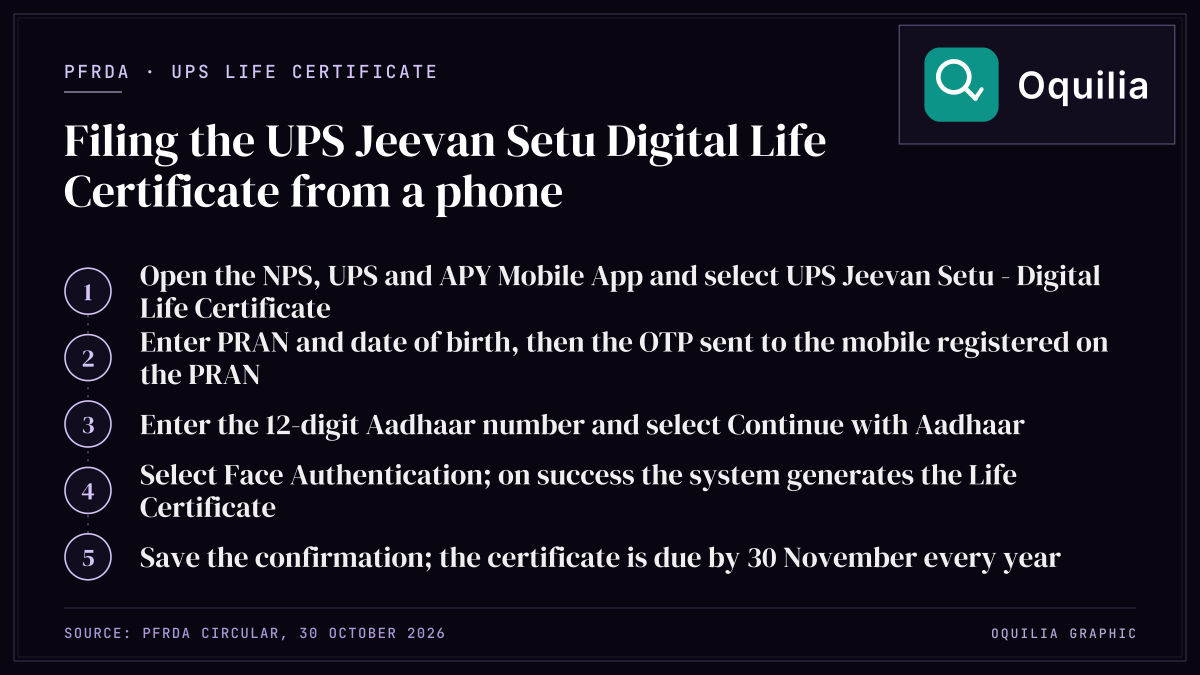
Every pensioner under the Unified Pension Scheme (UPS) now has 30 November as a fixed annual date in the calendar. On 30 October 2026 the Pension Fund Regulatory and Development Authority (PFRDA) issued Circular No. PFRDA/2026/54/SUP-CG-SG/02, operationalising "UPS Jeevan Setu - Digital Life Certificate (DLC)", a mobile facility that lets UPS pensioners generate and submit their life certificate through Aadhaar face authentication. The circular is addressed to the Principal Accounts Offices (PrAOs), Pay and Accounts Offices (PAOs) and Drawing and Disbursing Officers (DDOs) of the Central Government.
As of 8 November 2026, a UPS pensioner has 22 days left to complete the process for this year. This guide sets out what the 5-paragraph circular says, walks through the 10-step annexure, works through the money at stake, and lists the errors most likely to cost a pensioner a month's payout.
What the Section Says
The circular runs to 5 numbered paragraphs and a 1-page annexure. PFRDA's circular page lists it under the Unified Pension Scheme, published on 30-10-2026 (the web listing spells the facility "Jeewan"; the signed PDF spells it "Jeevan"). In plain English, the 5 paragraphs say the following.
| Para | What the circular says | What it means for a UPS pensioner |
|---|---|---|
| 1 | "UPS Jeevan Setu - Digital Life Certificate (DLC)" is a mobile application-based facility for UPS pensioners to generate and submit DLCs through Aadhaar-based authentication | Proof of being alive can be given from a phone, without a visit to an office |
| 2 | The facility aims to simplify submission and improve timely compliance; it is available through the NPS by Protean eGov mobile application, with the procedure in an annexure | The app to use is the NPS app published by Protean eGov |
| 3 | All UPS pensioners must submit DLCs annually by 30 November to ensure uninterrupted continuation of monthly assured payouts | The deadline repeats every year, not just in 2026 |
| 4 | Nodal offices must disseminate the information widely, including the timelines, to avoid interruption in monthly payouts | Pensioners can ask their PAO or DDO for help |
| 5 | The circular issues with the approval of the Competent Authority | It is a binding operational instruction, signed by Chief General Manager Sumit Kumar |
The key operative sentence is paragraph 3: the certificate must reach the system by 30 November each year, and the stated purpose is "uninterrupted continuation" of the monthly assured payout. The circular does not set out a separate penalty, so the practical risk is the one it names, an interruption in monthly payouts.
The 10-step process in the annexure
The annexure, titled "Process for generating Digital Life Certificate", lists 10 steps. Keep the Pension Retirement Account Number (PRAN), date of birth, the mobile number registered against the PRAN and the 12-digit Aadhaar number ready before starting.
| Step | Action in the app | What you need |
|---|---|---|
| 1 | Open the NPS, UPS and APY Mobile App | The Protean eGov app installed |
| 2 | Select "UPS Jeevan Setu - Digital Life Certificate" on the home screen | - |
| 3 | Enter PRAN and date of birth, then the OTP sent to the registered mobile | PRAN, DOB, registered mobile |
| 4 | Select Aadhaar and enter the Aadhaar number | 12-digit Aadhaar |
| 5 | Select "Continue with Aadhaar" and complete authentication | Aadhaar linked details |
| 6 | Select "Face Authentication" | Front camera, good light |
| 7 | On success, the system generates the Life Certificate | - |
| 8 | A confirmation that the certificate was generated successfully appears | Note or screenshot it |
| 9 | Click "Done" to exit | - |
| 10 | The certificate is validated through Aadhaar | - |
Step 3 is where most failed attempts begin: the OTP goes only to the mobile number registered on the PRAN, so a pensioner who has changed numbers since retirement should update it with the nodal office first. For background on how the PRAN account works, see the NPS glossary entry and the pension glossary entry.
Worked Example
The circular does not set payout amounts, so the figures below are illustrative monthly assured payouts chosen to show the arithmetic. Use your own pension payment order for the real number, and the NPS calculator or pension calculator to model retirement income.
Example 1: the cost of a missed month. Take a retired central government employee, Pensioner A, with a monthly assured payout of Rs 60,000 under UPS. Over 12 months that is Rs 7,20,000 a year. If the DLC is not submitted by 30 November and the payout is interrupted for even 1 month, Rs 60,000 of cash flow is held up; an interruption of 3 months holds up Rs 1,80,000, which is 25% of the year's pension.
| Months interrupted | Payout held up (at Rs 60,000/month) | Share of annual pension |
|---|---|---|
| 1 | Rs 60,000 | 8.3% |
| 2 | Rs 1,20,000 | 16.7% |
| 3 | Rs 1,80,000 | 25.0% |
Example 2: how the pension is taxed. Pension received from a former employer is taxed under the head "Salaries"; Section 17(1)(ii) of the Income-tax Act, 1961 includes "any annuity or pension" in salary. That matters for budgeting the payout, because tax deducted at source (see TDS) reduces the monthly credit. The table uses the FY 2025-26 new-regime figures in Oquilia's rate tables: standard deduction Rs 75,000, nil tax up to Rs 4 lakh, Section 87A rebate up to Rs 60,000 for taxable income up to Rs 12 lakh, and 4% health and education cess.
| Item | Pensioner A (Rs 60,000/month) | Pensioner B (Rs 1,50,000/month) |
|---|---|---|
| Annual pension | Rs 7,20,000 | Rs 18,00,000 |
| Less standard deduction | Rs 75,000 | Rs 75,000 |
| Taxable income | Rs 6,45,000 | Rs 17,25,000 |
| Tax on Rs 4-8 lakh at 5% | Rs 12,250 | Rs 20,000 |
| Tax on Rs 8-12 lakh at 10% | - | Rs 40,000 |
| Tax on Rs 12-16 lakh at 15% | - | Rs 60,000 |
| Tax on Rs 16-20 lakh at 20% | - | Rs 25,000 |
| Tax before rebate | Rs 12,250 | Rs 1,45,000 |
| Section 87A rebate | Rs 12,250 | Nil (income above Rs 12 lakh) |
| Cess at 4% | Nil | Rs 5,800 |
| Total tax | Nil | Rs 1,50,800 |
For Pensioner B, Rs 1,50,800 spread over 12 months is about Rs 12,567 a month of TDS. If the payout pauses because the DLC is late, the annual tax computation in this table does not change; only the timing of the credits does. Run your own figures in the income tax calculator or compare regimes with the old vs new regime tool.
Example 3: the calendar. The circular was issued on 30 October 2026, giving a 31-day window to the first deadline. A pensioner who starts on 8 November has 22 days; one who leaves it to the last week has 7 days to fix a mobile-number mismatch or an Aadhaar face-authentication failure, which is rarely enough if the nodal office has to update records.
Common Mistakes
These pitfalls follow directly from the 10 steps and 3 data points (PRAN, date of birth, registered mobile) the annexure relies on.
- Treating 30 November as a one-off. Paragraph 3 says DLCs are due "annually by 30 November". Set a reminder for 1 November every year, not just for 2026.
- Using an outdated mobile number. Step 3 sends the OTP only to the number registered on the PRAN. A pensioner with a lapsed SIM cannot get past step 3 until the record is updated, so start the update well inside the 22 days left in 2026.
- Mistyping the date of birth. The DOB must match the PRAN record exactly. A mismatch in step 3 stops the flow before Aadhaar authentication starts.
- Choosing the wrong app. The circular names the NPS by Protean eGov mobile application, which the annexure calls the "NPS, UPS and APY Mobile App". A look-alike app is not the channel PFRDA has notified.
- Poor conditions for face authentication. Step 6 uses the phone camera; dim light, spectacles glare or a cracked lens can cause repeated failures. Try in daylight before 25 November to leave a buffer.
- Not saving the confirmation. Step 8 shows a "generated successfully" message. Take a screenshot with the date visible; if a payout is interrupted, the nodal office will need proof of the submission date.
- Assuming the DDO will file it. Under paragraph 4 the PrAOs, PAOs and DDOs are told to publicise the facility, not to submit the certificate on the pensioner's behalf. The duty in paragraph 3 sits with "all pensioners under the UPS".
- Ignoring tax on arrears. If a missed DLC delays 2 or 3 months of payouts, the arrears are still pension income. Pensioner B in the example above has about Rs 12,567 a month of tax to account for regardless of when the credit arrives.
FAQ
Who has to submit the UPS Jeevan Setu Digital Life Certificate?
Paragraph 3 of PFRDA Circular PFRDA/2026/54/SUP-CG-SG/02 dated 30 October 2026 applies to "all pensioners under the UPS". Every UPS pensioner receiving a monthly assured payout must submit the DLC once a year.
What is the deadline?
30 November every year. For 2026, a pensioner reading this on 8 November has 22 days. The circular ties the deadline to "uninterrupted continuation" of monthly assured payouts.
Which app do I use?
The circular names the NPS by Protean eGov mobile application; the annexure calls it the "NPS, UPS and APY Mobile App". Select "UPS Jeevan Setu - Digital Life Certificate" from the home screen, as step 2 of the annexure says.
What details do I need?
Four items: the PRAN, the date of birth, the mobile number registered against the PRAN (for the OTP in step 3) and the 12-digit Aadhaar number (step 4). Step 6 then uses face authentication through the phone's camera.
How do I know the certificate has been accepted?
Step 8 displays a message that the Life Certificate has been generated successfully, and step 10 says the certificate is validated through Aadhaar. Save a screenshot of the step 8 message as a record.
Is the UPS pension taxable?
Yes. Pension from a former employer is part of salary under Section 17(1)(ii) of the Income-tax Act, 1961. In the worked example, a Rs 60,000 monthly payout attracts nil tax under the FY 2025-26 new regime after the Rs 75,000 standard deduction and Section 87A rebate, while Rs 1,50,000 a month attracts Rs 1,50,800. Check current rates on incometax.gov.in.
Who do I contact if the app fails?
Paragraph 4 makes the nodal offices (PrAOs, PAOs and DDOs of the Central Government) responsible for awareness of the facility and its timelines. Contact the office that handles your pension, and do so well before 30 November so there is time to correct a PRAN, DOB or mobile-number record.
Sources & Citations
- Circular No. PFRDA/2026/54/SUP-CG-SG/02: Operationalisation of UPS Jeevan Setu - Digital Life Certificate (DLC) — PFRDA
- Operationalisation of UPS Jeewan Setu - Digital Life Certificate facility (circular page) — PFRDA
- Income-tax Act, 1961 — India Code
- Income Tax Department e-filing portal — Income Tax Department