

Received a Form 121 nil-tax declaration? How deductors file it by the 7th and build the 26-character UIN
Deductors holding Form 121 nil-tax declarations must file them quarterly by the 7th of the following month, with a 26-character UIN per declarant. Step-by-step guide.
Key points
- The Income Tax Department's user manual says deductors who receive Form 121 nil-tax declarations must file them on the e-filing portal using their TAN.
- Filing is due by the 7th of the month after each quarter, so the October to December 2026 quarter must be filed by 7 January 2027.
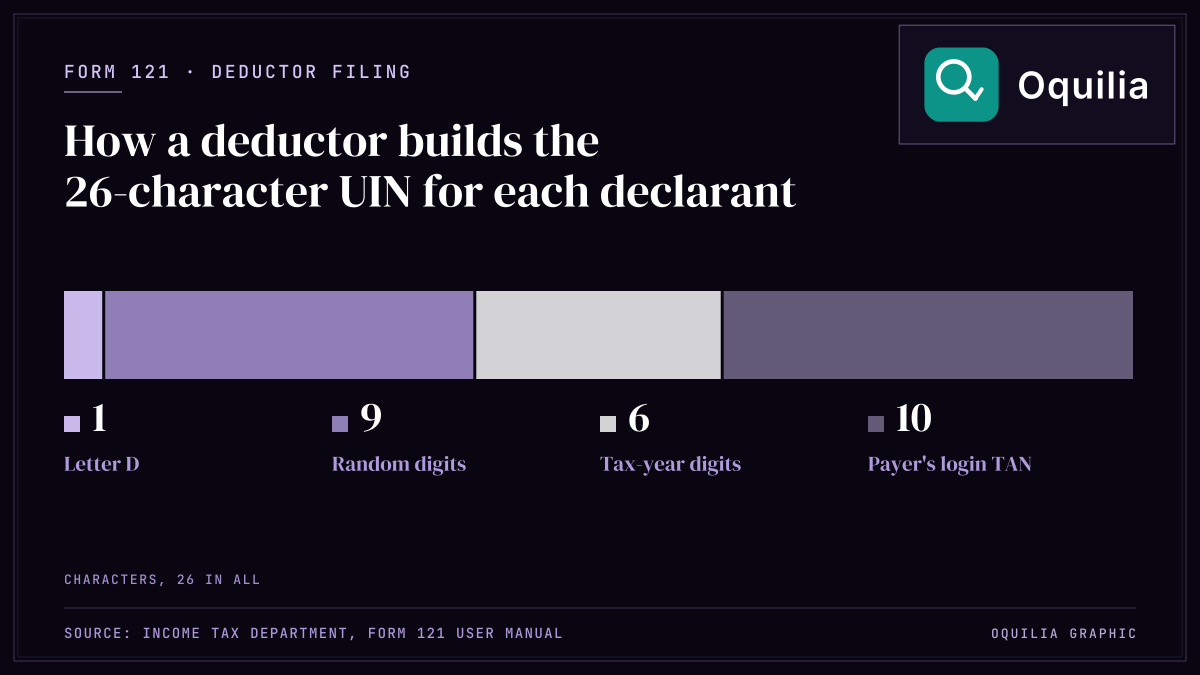
- Each declarant needs a 26-character UIN made of the letter D, 9 random digits, 6 tax-year digits and the payer's 10-character TAN.
A payee who expects to owe no income tax for the year can hand the payer a Form No. 121 declaration, and the payer may then pay without deducting TDS on the specified payments. The declaration is only half the job. The deductor must also report every Form 121 it has received to the Income Tax Department through the e-filing portal, quarter by quarter, by the 7th of the month after the quarter ends. This guide walks through that deductor-side filing step by step, using only what the Income Tax Department sets out in its official Form 121 User Manual.
With the October to December 2026 quarter closing in 37 days, on 31 December 2026, the next filing falls due on 7 January 2027. Deductors who collected declarations at the start of the tax year in April 2026 should already have filed for two quarters.
What the Section Says
Form No. 121 is a statutory declaration prescribed under the Income-tax Rules, 2026. According to the Income Tax Department's user manual, it is the form "through which a taxpayer declares that tax liability on its estimated total income for the relevant tax year is nil". On the strength of that declaration, the payer (the deductor) "is permitted to not deduct tax at source (TDS) on specified payments".
The manual sets out three timing points. First, the declarant should furnish the declaration in time "to ensure that tax is not deducted in the first place". Second, it should ideally be submitted before the income is credited or paid. Third, it should preferably be given at the start of the tax year, which for 2026-27 means on or soon after 1 April 2026.
For the deductor, the manual is explicit on one date: filing of Form 121 is due on the 7th of the month following the quarter. It also lists 3 prerequisites before the deductor can file:
| # | Prerequisite (per the Form 121 User Manual) | What it means in practice |
|---|---|---|
| 1 | Valid TAN registered on the e-filing portal | The login User ID is the 10-character TAN, not a PAN |
| 2 | Declaration received from the payee is complete and valid | Incomplete declarations should be returned before the quarter closes |
| 3 | Unique Identification Number (UIN) assigned to each declarant | One 26-character UIN per declarant, built by the deductor |
The form sits under the category "Forms as per Income Tax Act 2025" on the portal, which signals that it belongs to the new statute in force for tax years from 2026-27. Readers looking for the underlying rules text can find it on the Income Tax Department portal.
How the 26-character UIN is built
The single most technical requirement is the UIN. The manual defines it as a 26-character number made of 4 parts, in this order:
| Position | Characters | Content | Source |
|---|---|---|---|
| 1 | 1 | The letter "D" | Fixed |
| 2 to 10 | 9 | Random numerical digits | Chosen by the deductor |
| 11 to 16 | 6 | Digits of the tax year selected on the landing screen | Tax year chosen when filing |
| 17 to 26 | 10 | The payer's login TAN | Deductor's TAN |
| Total | 26 |
The arithmetic is simple: 1 + 9 + 6 + 10 = 26. A UIN with 25 or 27 characters will fail validation, and so will one whose last 10 characters do not match the TAN used to log in.
Worked Example
Take a hypothetical deductor, a housing co-operative that pays interest on members' deposits, with the illustrative TAN ABCD12345E (10 characters). In the tax year 2026-27 it receives Form 121 declarations from 3 members.
Member A gives the declaration on 3 April 2026. Member A's own estimate, run through the Oquilia income tax calculator, shows interest of Rs 40,000 as the only income and a computed tax of nil for 2026-27. Member B gives it on 15 July 2026. Member C gives it on 12 November 2026.
Each declaration is reported in the quarter it was received. Applying the manual's rule of the 7th of the following month gives this calendar for 2026-27:
| Quarter of tax year 2026-27 | Period | Form 121 filing due by | Declarations in this example |
|---|---|---|---|
| Q1 | 1 April to 30 June 2026 | 7 July 2026 | Member A |
| Q2 | 1 July to 30 September 2026 | 7 October 2026 | Member B |
| Q3 | 1 October to 31 December 2026 | 7 January 2027 | Member C |
| Q4 | 1 January to 31 March 2027 | 7 April 2027 | None so far |
For Member C, the co-operative builds a UIN. It picks 9 random digits, say 418203957, and appends the 6 tax-year digits as the portal's instruction sheet prescribes for 2026-27, followed by the TAN:
D + 418203957 + [6 tax-year digits] + ABCD12345E
The result is 1 + 9 + 6 + 10 = 26 characters. The manual does not print a sample of the 6-digit tax-year block, so the deductor should copy the exact format from the instruction sheet linked on the form page rather than guess it.
Filing the Q3 return, step by step
The manual lists 18 steps. Condensed for the Q3 filing due on 7 January 2027, they run as follows:
- Visit the e-filing portal at incometax.gov.in and log in with the TAN as User ID (steps 1 and 2).
- Go to e-File, then Income Tax Forms, then File Income Tax Forms (step 3).
- Under "Forms as per Income Tax Act 2025", select "Deduction and Collection at source (Form 121)" and click File Now (step 4).
- Select the filing type, tax year 2026-27 and quarter Q3, then click Continue and "Let's get Started" (steps 5 and 6).
- Complete the 3 sections: details of the person responsible for paying income; details of declarant and declaration received; and the declaration (step 7).
- In section 1, name, address and email are prefilled from the profile; enter the PAN and click Save (step 8). Profile changes are made under My Profile, not on the form.
- In section 2, download the instruction sheet and the Excel template, fill columns A to T (20 columns), save as .CSV and upload. The file may be up to 200 MB (step 10).
- If the upload throws errors, download the error file, correct the CSV and upload again (step 10).
- In section 3, tick the check box, enter the place and click Save (step 12).
- Click Preview, then Proceed to E-Verify, and verify by an available method (steps 13 to 15).
- Note the acknowledgement number and transaction ID, which are also emailed to the registered address (step 16).
- To check the filing later, go to e-File, Income Tax Forms, View Filed Forms and click View all under Form 121 (steps 17 and 18).
The co-operative uploads 1 row for Member C in Q3. Member A was reported in the Q1 filing due on 7 July 2026, and Member B in the Q2 filing due on 7 October 2026.
Before paying interest without deduction, it helps to know what the deduction would otherwise have been. The Oquilia TDS calculator shows the amount that a valid Form 121 keeps from being withheld, and declarants weighing their own position can compare regimes with the old vs new regime calculator.
Common Mistakes
The Form 121 User Manual lists 3 prerequisites and 18 steps, and most errors trace back to one of them. The pitfalls below are those the manual's own warnings point to.
1. Treating the payee's declaration as the end of the process. The declaration lets the deductor skip TDS, but the deductor still has a separate quarterly filing due by the 7th. A declaration received on 12 November 2026 belongs in the Q3 return due on 7 January 2027.
2. Building the UIN with the wrong TAN. The last 10 characters must be the TAN used to log in. A group with 2 or more TANs, for example separate branches, must use each branch's own TAN in that branch's UINs.
3. Getting the tax-year block wrong. The 6 tax-year digits must match the tax year selected on the landing screen. A UIN built for 2026-27 cannot be reused in a filing made for another tax year.
4. Editing the CSV outside the 20 template columns. The template runs from column A to column T. Adding, deleting or reordering columns is a common cause of upload errors, and the manual's remedy is to download the error file and correct it against the instruction sheet.
5. Trying to change prefilled payer details on the form. Name, address and email come from the profile. The manual says changes must be made under My Profile; section 1 only asks for the PAN.
6. Not completing e-verification. The form is submitted only after step 15. A form saved at the preview stage on 6 January 2027 and verified on 8 January 2027 is filed a day after the 7 January due date.
7. Not keeping the acknowledgement number. Step 16 asks the deductor to note both the acknowledgement number and the transaction ID. Payees reconciling their Form 26AS or AIS may later ask the deductor to confirm the filing.
8. Accepting declarations late in the year without checking completeness. The manual's second prerequisite is that the declaration is "complete and valid". A deductor that files an incomplete declaration in its Q4 return due on 7 April 2027 has little time left to fix it.
FAQ
What is Form 121 under the Income-tax Rules, 2026?
Form No. 121 is a statutory declaration under the Income-tax Rules, 2026 by which a taxpayer declares that the tax on its estimated total income for the tax year is nil. On that basis the payer may pay specified payments without deducting TDS, as the Income Tax Department's user manual states.
By when must a deductor file Form 121?
By the 7th of the month following the quarter. For tax year 2026-27 that means 7 July 2026, 7 October 2026, 7 January 2027 and 7 April 2027 for the 4 quarters.
How is the 26-character UIN made up?
It is the letter "D", then 9 random digits, then 6 digits of the tax year selected on the landing screen, then the payer's 10-character TAN. That adds up to 1 + 9 + 6 + 10 = 26 characters.
Who logs in to file Form 121, the payee or the payer?
The payer. The manual requires a valid TAN registered on the e-filing portal, and the login User ID is the TAN. The payee only gives the declaration to the payer.
What is the file size limit for the CSV upload?
The CSV built from the Excel template (columns A to T) can be up to 200 MB, according to the manual.
What should a deductor do if the CSV upload fails?
Download the error file from the "Click here" link, correct the CSV against the instruction sheet and upload it again. The manual describes this at step 10.
Where can a deductor see a Form 121 already filed?
Under e-File, then Income Tax Forms, then View Filed Forms, by clicking View all under Form 121. The acknowledgement number and transaction ID are also sent to the registered email ID.
Source: Income Tax Department, Form 121 User Manual, accessed 24 November 2026. This guide explains the filing process only; it does not cover income limits or penalties, which the manual does not set out.
Sources & Citations
- Form 121 User Manual — Income Tax Department
- Income Tax e-filing portal — Income Tax Department