

Paid tax under the wrong year or head? The e-filing challan correction window is 7 days for year, 30 days for head
The e-Filing portal lets PAN holders fix a challan's assessment year within 7 days and its major or minor head within 30 days, once per challan. Conditions, steps and pitfalls.
Key points
- The Income Tax Department's e-Filing portal lets PAN holders correct a challan's year, major head and minor head themselves.
- A wrong Tax Year or AY must be corrected within 7 days of the Challan Deposit Date, and a wrong head within 30 days.
- Only one online correction is allowed per challan, so check all three fields at once; later fixes go to the Assessing Officer.
A tax payment made under the wrong assessment year, or tagged as advance tax when it was meant to be self-assessment tax, does not vanish. The money sits with the government, but it may not be matched to the liability it was meant to settle. Since the Income Tax Department added a Challan Correction service to the e-Filing portal, PAN holders can fix three of these errors themselves, without writing to their Assessing Officer. The catch is the clock: according to the department's Challan Correction Request User Manual, a wrong year must be corrected within 7 days of the Challan Deposit Date, and a wrong tax head within 30 days.
This guide sets out what the portal allows, the two deadlines, a worked example with dates, and the 7 mistakes that most often push taxpayers back to the slower offline route.
What the Section Says
The facility is not a section of the Income-tax Act; it is an e-Filing service described in the department's user manual. Its rules, in plain English, are set out below. The manual says the service exists so that challans are "accurately mapped to the taxpayer's account", which is what allows the credit to appear against the right year in your Form 26AS and in your return.
The 3 attributes you can correct
The manual lists 3 attributes that a PAN holder can change on the portal:
- Tax Year or Assessment Year (AY), the year for which the payment is credited.
- Tax Applicable (Major Head), the code for the type of tax, with examples given in the manual such as 0020, 0021, 0023, 0026, 0028 and 0034.
- Type of Payment (Minor Head), the code that says why you paid, limited on the portal to 3 codes: 100, 300 and 400.
More than 1 attribute can be selected in the same request, according to Step 4 of the manual.
| Attribute to correct | What it controls | Portal deadline | If outside the portal rules |
|---|---|---|---|
| Tax Year / Assessment Year | The year the payment is credited to | Within 7 days of the Challan Deposit Date (CIN generation) | Jurisdictional Assessing Officer |
| Major Head (Tax Applicable) | Type of tax, e.g. 0020, 0021, 0034 | Within 30 days of the Challan Deposit Date | Jurisdictional Assessing Officer |
| Minor Head (Type of Payment) | 100 Advance Tax, 300 Self-Assessment Tax, 400 Demand Payment as Regular Assessment Tax | Within 30 days of the Challan Deposit Date | Jurisdictional Assessing Officer for any other minor head |
The 4 conditions before you start
The manual sets 4 prerequisites. The request can be filed only post-login by a registered PAN user. The challan must not have been consumed during processing, which in practice means it has not already been used against a return or a demand. No other correction request for that challan can be pending with any other authority. And the challan must pertain to AY 2020-21 or later; for earlier years, the manual directs taxpayers to the Jurisdictional Assessing Officer.
There is also a one-time limit: a challan can be corrected only once on the e-Filing portal. Any second correction on the same challan has to go to the Jurisdictional Assessing Officer, according to the manual.
Where the TDS challan fits in
The service is for challans paid against a PAN. The manual states that corrections of ITNS 281 challans, used by deductors paying TDS or TCS against a TAN, are handled on the TRACES portal at www.tdscpc.gov.in, not on the e-Filing portal. If you deduct tax as an employer or tenant and paid against the wrong TAN detail, the TDS calculator will help you work out the amount, but the correction itself sits on TRACES.
The 10 steps on the portal
The manual's step-by-step path runs as follows:
| Step | Action on the e-Filing portal |
|---|---|
| 1 | Log in with user ID and password (individuals whose PAN is not linked to Aadhaar see a "Link Now" pop-up) |
| 2 | Dashboard > Services > Challan Correction |
| 3 | Click "+ Create Challan Correction Request" |
| 4 | Select the attribute(s) to correct: year, major head, minor head |
| 5 | Select the challan by Tax Year/AY or by CIN; only unconsumed challans are shown |
| 6 | Edit the attributes on the "Correction in Challan" page |
| 7 | Review the summary of changes |
| 8 | E-verify through Aadhaar OTP, DSC, EVC or another option |
| 9 | See the success message and "View Challan Correction Status" |
| 10 | Track status by repeating Steps 1 to 3; updates may take 7-20 days |
At Step 5, the manual notes that a challan created on a Tax Year basis is searched using the Tax Year and CIN option, while one created on an AY basis is searched by Assessment Year and CIN. At Step 6, either kind can be switched to the other basis, and the year, major head and minor head can be updated where applicable. If the system finds no unconsumed challan, it shows the message: "Please ensure that you are applying for correction only for unconsumed challans, as consumed challans are not eligible for online correction."
E-verification at Step 8 uses the same options described in the department's e-verification guide.
Worked Example
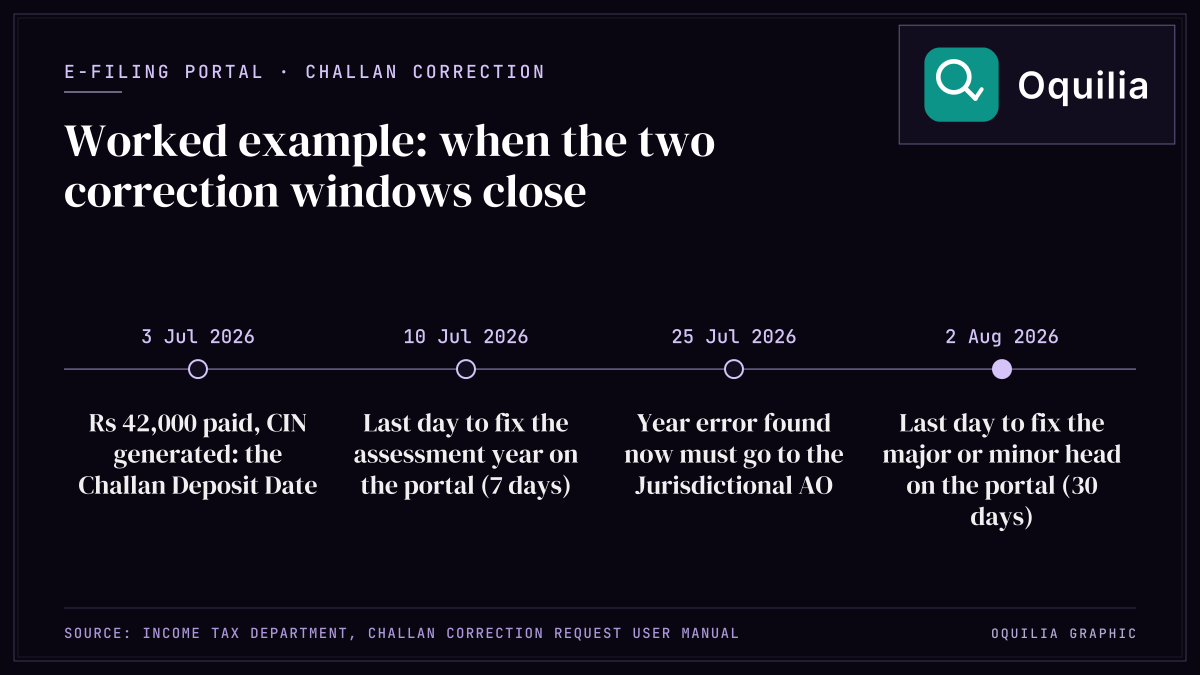
Take a salaried taxpayer with gross salary of Rs 18,00,000 who finds, while preparing the return for assessment year 2026-27, that TDS has fallen short. Using the income tax calculator, the taxpayer works out a balance of Rs 42,000 and pays it on 3 July 2026. The CIN is generated the same day, so 3 July 2026 is the Challan Deposit Date.
Two errors are spotted when the payment receipt is checked a few days later:
- The challan shows AY 2025-26 instead of AY 2026-27.
- The minor head is 100 (Advance Tax) instead of 300 (Self-Assessment Tax), because the default option was not changed.
Counting forward from the deposit date, the two windows close on different days:
| Error | Rule in the manual | Deposit date | Last day on the portal (counting from deposit) | What happens if missed |
|---|---|---|---|---|
| Wrong AY (2025-26 instead of 2026-27) | Within 7 days | 3 July 2026 | 10 July 2026 | Request goes to the Jurisdictional AO |
| Wrong minor head (100 instead of 300) | Within 30 days | 3 July 2026 | 2 August 2026 | Request goes to the Jurisdictional AO |
Because the manual allows more than 1 attribute in a single request, and only 1 portal correction per challan, the taxpayer should fix both errors together, before 10 July 2026. Fixing only the minor head on, say, 20 July 2026 would use up the one-time online correction while the year error, by then past its 7-day window, would still need the Assessing Officer.
Now change the facts. Suppose the taxpayer noticed only on 25 July 2026. The 7-day year window closed on 10 July 2026, so the AY error cannot be fixed online. The minor-head error is still inside its 30-day window until 2 August 2026, but filing it online would still leave the year error for the AO. In that case, it may be simpler to send both issues to the Jurisdictional AO in 1 request than to split them across 2 channels.
A third variation shows why the "unconsumed" condition matters. If the taxpayer had already filed the return on 5 July 2026 and the Rs 42,000 had been claimed against it, the challan may count as consumed during processing. The manual states plainly that consumed challans are not eligible for online correction, so the portal route closes regardless of the 7-day or 30-day clock.
Even after a successful request, the manual warns that the status can take 7-20 days to update. A taxpayer close to the return due date should file the correction early and keep the acknowledgement, rather than wait for the status before filing the return.
Common Mistakes
The portal rules are short, but 7 errors recur. Each one either misses a deadline or wastes the one-time correction.
1. Treating the 7-day and 30-day windows as one. The manual gives 2 separate windows: 7 days for the year and 30 days for the major or minor head. A taxpayer who reads "30 days" and waits 2 weeks to fix a wrong AY has already missed the online route.
2. Correcting one error and discovering another later. Since only 1 correction per challan is allowed on the portal, check all 3 attributes (year, major head, minor head) on the challan receipt on the day you pay. The manual lets you select multiple attributes at Step 4.
3. Trying to correct a challan already used in the return. A challan consumed during processing cannot be corrected online. If you have filed the return claiming the payment, check the challan's status before assuming the portal will accept the request.
4. Using the portal for a minor head outside 100, 300 and 400. The online service covers only Advance Tax (100), Self-Assessment Tax (300) and Demand Payment as Regular Assessment Tax (400). For any other minor head, the manual directs the request to the Jurisdictional Assessing Officer.
5. Looking for TDS challans on the e-Filing portal. An ITNS 281 challan paid against a TAN is corrected on TRACES (www.tdscpc.gov.in), according to the manual. Searching for it under Services > Challan Correction on the e-Filing portal will not work.
6. Assuming pre-2020 challans can be fixed online. Only challans for AY 2020-21 onwards are currently available for online correction. Older challans go to the Jurisdictional AO.
7. Not e-verifying the request. The request is completed only after e-verification at Step 8, through Aadhaar OTP, DSC, EVC or another option. An unverified request is not a submitted request.
A related point on advance tax: if the wrong minor head was on an instalment you meant as advance tax, the timing of the corrected payment still matters for interest. The advance tax calculator and the glossary entries on advance tax and self-assessment tax explain how the two payment types differ.
FAQ
How long do I have to correct the assessment year on a challan?
Within 7 days of the Challan Deposit Date, which the manual defines as the date of CIN generation. After that, the request goes to the Jurisdictional Assessing Officer.
How long do I have to change the major head or minor head?
Within 30 days of the Challan Deposit Date, according to the Income Tax Department's Challan Correction Request User Manual.
Which minor heads can be corrected online?
Only 3: 100 (Advance Tax), 300 (Self-Assessment Tax) and 400 (Demand Payment as Regular Assessment Tax). Any other minor head must be corrected through the Jurisdictional Assessing Officer.
Can I correct the same challan twice on the portal?
No. The manual allows only 1 correction request per challan on the e-Filing portal. A further correction must be sought from the Jurisdictional Assessing Officer.
Can I correct a challan from AY 2019-20?
Not online. The portal currently covers challans from AY 2020-21 onwards. For earlier years, the manual directs taxpayers to the Jurisdictional Assessing Officer.
How do I correct a TDS challan paid under my TAN?
Corrections to ITNS 281 challans paid against a TAN are made on the TRACES portal (www.tdscpc.gov.in), not on the e-Filing portal.
How long does the correction take to show?
The manual says the status may take 7-20 days to update on the portal. You can track it under Services > Challan Correction after logging in.
Sources & Citations
- Challan Correction Request User Manual — Income Tax Department
- How to e-Verify User Manual — Income Tax Department