

How Do I View and Download My Annual Information Statement (AIS) on the e-Filing Portal?
Your AIS sits behind the e-Filing login under Section 285BB. The exact navigation, the PDF, JSON and CSV downloads, how TIS derived value drives prefill, and what a missed Rs 80,000 costs.
The Scenario
You filed your return for AY 2026-27 in the second week of July 2026, comfortably inside the 31 July 2026 deadline that applies to non-audit individuals. Your Form 16 showed a gross salary of Rs 14,00,000, the employer had already deducted tax under Section 192, and the return went through without drama. Six weeks later an SMS from the Income Tax Department asks you to "verify the information in your AIS" for FY 2025-26, and you have no idea what the statement contains or where to find it.
This is now the single most common reason a salaried filer reopens the e-Filing portal after filing. The Annual Information Statement is where the department parks everything a third party has reported against your PAN during the financial year: savings bank interest, fixed deposit interest, dividends, rent received, purchase and sale of securities and immovable property, foreign remittances and GST turnover, on top of the tax deducted at source that you already knew about (Income Tax Department, AIS FAQs).
None of that information reaches you by post. It sits behind a login, in a module most filers open once a year, and it downloads in three formats that behave very differently. What follows is the exact navigation, those three formats, the difference between the AIS and the Taxpayer Information Summary, and what a Rs 80,000 gap costs in tax.
Statutory Answer
The AIS is not an administrative courtesy. It is a statutory obligation under Section 285BB of the Income-tax Act, 1961, inserted to enlarge the scope of information made available to an assessee before filing. The section requires the prescribed income-tax authority to upload, in the registered account of the assessee, an annual information statement containing information in its possession.
Rule 114-I of the Income-tax Rules, 1962 names the authority: the Principal Director General of Income-tax (Systems), the Director General of Income-tax (Systems), or any person authorised by either, uploads the statement in the registered account of the assessee. That registered account is your e-Filing account at incometax.gov.in, which is why the AIS never arrives by post and why the SMS only tells you to go and look.
The department itself describes the AIS as "the extension of Form 26AS". Form 26AS displays property purchases, high-value investments and TDS/TCS transactions; the AIS adds savings account interest, dividend, rent received, securities and property transactions, foreign remittances, interest on deposits and GST turnover, and layers on a feedback facility that Form 26AS never had (Income Tax Department, AIS FAQs). If you are still working from the older statement alone, our glossary entries on Form 26AS and the AIS set out what moved where.
The department's FAQ lists three objectives: display complete information with a facility to capture online feedback, promote voluntary compliance and seamless prefilling, and deter non-compliance. The third is the one that generates the SMS.
Step by Step: Viewing and Downloading Your AIS
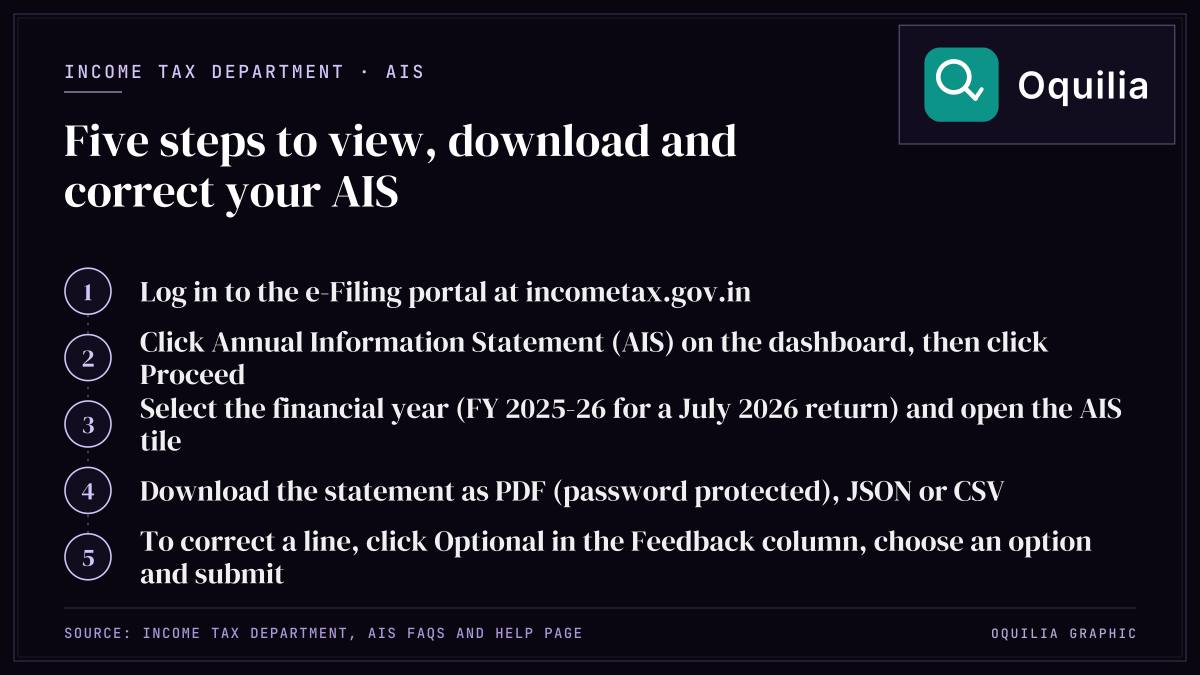
There are two published routes into the module, and both land in the same place. The department's help page for e-Filing services gives the dashboard route; the FAQ set gives the Services-menu route (Income Tax Department, AIS help).
| Step | Route A (dashboard) | Route B (Services menu) |
|---|---|---|
| 1 | Log in at incometax.gov.in | Log in at incometax.gov.in |
| 2 | Click "Annual Information Statement (AIS)" on the dashboard | Click "Annual Information Statement (AIS)" under the "Services" tab |
| 3 | Click Proceed to be redirected to the AIS portal | Click the AIS tab on the homepage |
| 4 | Click the AIS tile | Select the relevant financial year, then click the AIS tile |
A third path exists inside the return workflow: e-File > Income Tax Return > View AIS > Proceed, which redirects to the same AIS tile. Whichever route you take, set the financial year first. For a return filed in July 2026 the correct selection is FY 2025-26, not FY 2026-27.
Once the tile opens, the statement can be downloaded in three formats: PDF, JSON and CSV. They are not interchangeable:
| Format | Best used for | Practical note |
|---|---|---|
| Reading and record-keeping | Password protected on download; the format is set out in the Annual Information Statement User Guide in the "Resources" section of the AIS homepage | |
| JSON | Feeding the AIS Utility and matching against a return | Machine-readable, the format the department's own offline utility expects |
| CSV | Reconciling line items in a spreadsheet | Easiest way to sort 200-plus interest entries by information source |
If the statement runs to a handful of lines the PDF is enough; with deposits across four banks and a demat account, download the CSV and sort by information source first.
Reading TIS, and the Feedback That Changes Prefill
Alongside the AIS tile sits the Taxpayer Information Summary (TIS), and the distinction matters more than most filers realise. The AIS is line-level: every reported transaction, with its information code, description and value. The TIS is an information-category-wise aggregate, and it shows two figures for each category such as Salary, Interest or Dividend: the processed value, meaning the value generated after deduplication of information under pre-defined rules, and the derived value, meaning the value derived after considering both the processed value and your feedback. The department is explicit that "the derived information in TIS will be used for prefilling of return, if applicable" (Income Tax Department, AIS FAQs).
That single sentence is why feedback is worth filing. It is submitted from the AIS side, not the TIS side: click Optional in the Feedback column against the line, choose the feedback option on the Add Feedback screen, enter details and submit. The modified value then shows alongside the reported value, Activity History updates, an Acknowledgement Receipt becomes downloadable, and email and SMS confirmations are sent. There is currently no limit on how often a given feedback may be modified.
After feedback is filed you can download the AIS Consolidated Feedback File (ACF), a single PDF carrying every piece of feedback other than "Information is correct". Two other tabs are worth knowing: Activity History, which creates a system-generated Activity ID for each action with date and description, and the Other Information tab, where GST turnover appears under information code EXC-GSTR3B.
Worked Resolution
Take the filer from the scenario. Gross salary Rs 14,00,000 for FY 2025-26, taxed under the new regime. The return was filed on salary alone. The AIS, once opened in September 2026, shows two further lines: Rs 62,000 of savings bank and fixed deposit interest across three banks, and Rs 18,000 of dividend reported by a registrar and transfer agent. Neither figure appeared in Form 16, because Section 192 obliges the employer to deduct only on estimated salary income.
The standard deduction in the new regime is Rs 75,000, against Rs 50,000 in the old. No Section 80TTA relief is available in the new regime, so the full Rs 80,000 of other income is taxable.
| Line | Return as filed | Return as AIS shows it |
|---|---|---|
| Gross salary | 14,00,000 | 14,00,000 |
| Less: standard deduction | (75,000) | (75,000) |
| Income from other sources | Nil | 80,000 |
| Total income | 13,25,000 | 14,05,000 |
| Tax: Rs 0 to Rs 4,00,000 at 0% | Nil | Nil |
| Tax: Rs 4,00,001 to Rs 8,00,000 at 5% | 20,000 | 20,000 |
| Tax: Rs 8,00,001 to Rs 12,00,000 at 10% | 40,000 | 40,000 |
| Tax: above Rs 12,00,000 at 15% | 18,750 | 30,750 |
| Tax before cess | 78,750 | 90,750 |
| Health and education cess at 4% | 3,150 | 3,630 |
| Total tax | 81,900 | 94,380 |
The gap is Rs 12,480. No Section 87A rebate arises on either column: in the new regime for FY 2025-26 the rebate runs up to Rs 60,000 and only where total income does not exceed Rs 12,00,000, and both figures here sit above that line. You can reproduce the whole computation, including the marginal relief band just above Rs 12,00,000, in our income tax calculator, and test the same salary against the older structure using the old versus new regime comparison.
Two details decide what happens next. First, the Rs 62,000 of interest almost certainly carried no TDS, because the Section 194A threshold stands at Rs 50,000 per bank, and Rs 1,00,000 for senior citizens, after Budget 2025; three banks splitting Rs 62,000 each fall under it. Tax not deducted is still tax owed, and the TDS calculator shows where deduction would have triggered. Second, with the return already filed, the Rs 12,480 shortfall must travel through a revised or updated return, and an updated return under Section 139(8A) carries its own defective notice risk if the tax is not paid before filing.
The deadline arithmetic is the last piece. For AY 2026-27 the non-audit individual due date was 31 July 2026 and a belated return runs to 31 December 2026, as set out in our note on the AY 2026-27 due dates. A revised return filed inside that window costs nothing beyond the tax and interest; waiting past it moves you into the updated-return machinery, with additional tax on top of the Rs 12,480.
FAQ
Is the AIS the same as Form 26AS?
No. The department describes the AIS as "the extension of Form 26AS". Form 26AS shows property purchases, high-value investments and TDS/TCS transactions; the AIS adds savings interest, dividend, rent received, securities and property transactions, foreign remittances, interest on deposits and GST turnover, plus a feedback facility. Our glossary entry on Form 26AS sets out the older statement's scope.
In what formats can I download the AIS?
Three: PDF, JSON and CSV. The PDF is the reading copy and is password protected, the JSON feeds the department's AIS Utility, and the CSV is the format to use when you need to sort several hundred lines by information source in a spreadsheet.
What is the difference between processed value and derived value in TIS?
Processed value is the figure generated after deduplication of information under pre-defined rules. Derived value is the figure arrived at after considering both the processed value and any feedback you have submitted. The derived value is what feeds the prefilled return, which is why unanswered feedback quietly becomes your filed position.
How many times can I change feedback I have already given?
There is currently no limit on the number of times a previously given feedback may be modified. Each change creates a fresh entry in the Activity History tab with its own Activity ID, date and description, and a new Acknowledgement Receipt can be downloaded.
What is the AIS Consolidated Feedback File?
The ACF is a single PDF that collects every piece of feedback you have submitted other than "Information is correct". It is downloadable after feedback has been filed, and it is the cleanest single document to keep on file if a query arrives later.
My AIS shows dividend I never received. What do I do?
Open the line in the AIS, click Optional in the Feedback column, choose the feedback option on the Add Feedback screen, enter details and submit. The modified value then displays alongside the reported value, with email and SMS confirmation. Do not simply omit the figure from the return: the derived value in TIS is what prefills, and an unchallenged entry stays in the department's record.
Does AIS show my GST turnover?
Yes. GST turnover appears under information code EXC-GSTR3B and is visible in the Other Information tab of the AIS. It is one of the categories that exists in the AIS and has never existed in Form 26AS.
Sources & Citations
- AIS - Annual Information Statement — Income Tax Department
- FAQs on AIS (Annual Information Statement) — Income Tax Department
- FAQ's on AIS (Annual Information Statement) - PDF — Income Tax Department